How to Practise on a Deriv Demo Account and Switch to a Real Account
A demo account lets you run bots with virtual funds. When you are ready, you switch to your real account from the same menu.
Last updated:
What a demo account is
Deriv describes a demo account as a trading account that lets you practise using virtual funds. In AI Binary Bots it is clearly labelled DEMO ACCOUNT and shows its own balance, so you can run bots, check trades and study the analytics without risking real money.
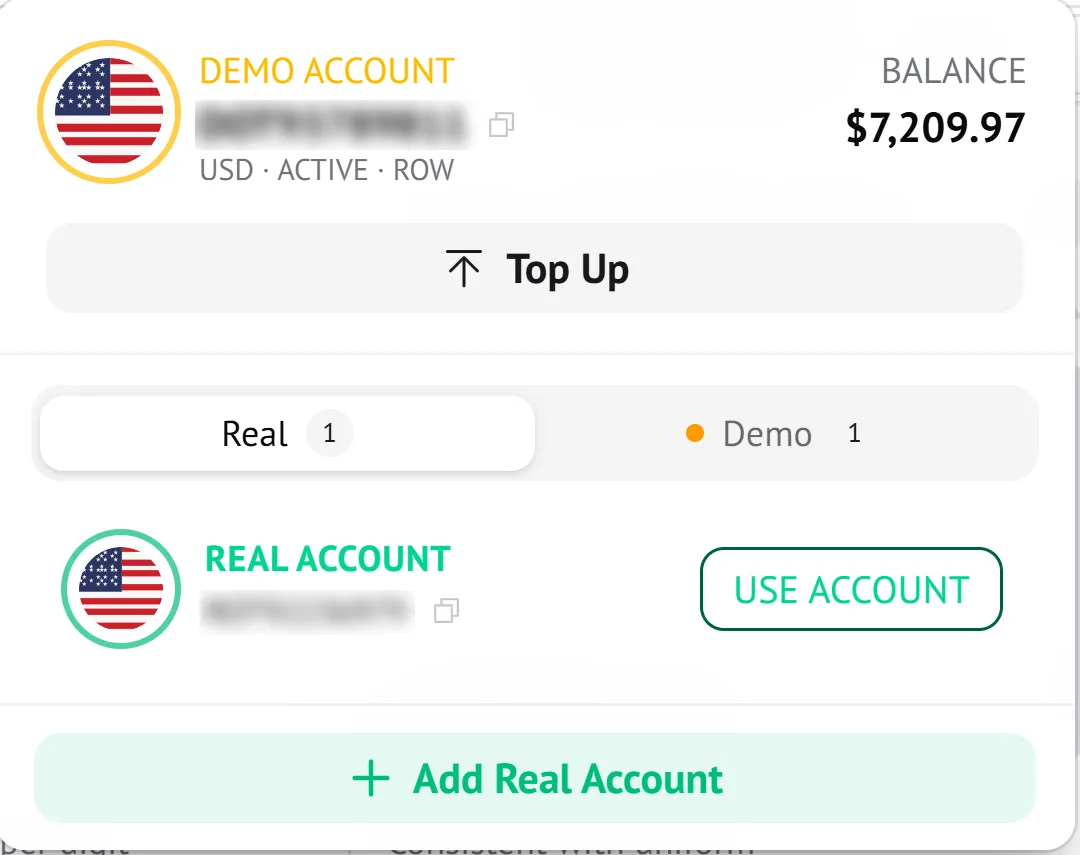
How to switch accounts
- Click your account at the top right of the bar. It shows your flag, a DEMO or REAL label and your account ID, next to your cash balance and profit / loss. The account menu opens.
- Use the Real and Demo tabs to see the accounts you have. Each tab shows how many accounts it contains.
- Press Use Account next to the account you want to trade with. The account you are on is marked Active Account.
- Check the label and balance at the top of the menu, which show which account is active.
- No real account yet? Use Add Real Account.
The demo account has a Top Up button beneath its balance.
What to check before going live
- Read your demo results in Trade analytics, including drawdown and largest loss, not only the win rate.
- Set a stop loss and take profit and make sure they suit your real balance.
- Start the real account with a stake that is small compared with your balance.
- Always confirm which account is active before you press play.
Demo results are not a promise
Deriv's own guidance notes that success on a demo account does not guarantee similar results with real money. Market feel, stake size and stress all change when real funds are involved.
Practise on a Deriv demo account before you use real money.
Get StartedFrequently asked questions
- Is a demo account free?
- A demo account runs on virtual funds, so you are not risking real money. Deriv describes it as a way to practise trading.
- How do I know which account I am using?
- The account menu labels the active account, for example DEMO ACCOUNT, and shows its balance. Check it before you start a bot.
- Can I switch back to demo after trading live?
- Yes. Use the Real and Demo tabs in the account menu and press Use Account on the one you want.
Keep reading
- Connect your Deriv accountAI Binary Bots trades through your own Deriv account. You can connect with a secure Deriv login or with an API token. Here is how each one works.
- Run your first botEverything you need to start a bot sits in one panel: market, contract, stake, risk limits and strategy. This walkthrough follows the panel from top to bottom.
- Trade analytics explainedTrade analytics summarises your settled trades in one view. This guide explains each metric and uses a real example where a 54% win rate still lost money.
Sources
Risk warning: Trading binary options involves a high level of risk and you could lose your entire stake. Only trade with money you can afford to lose. This page is educational and is not financial advice.